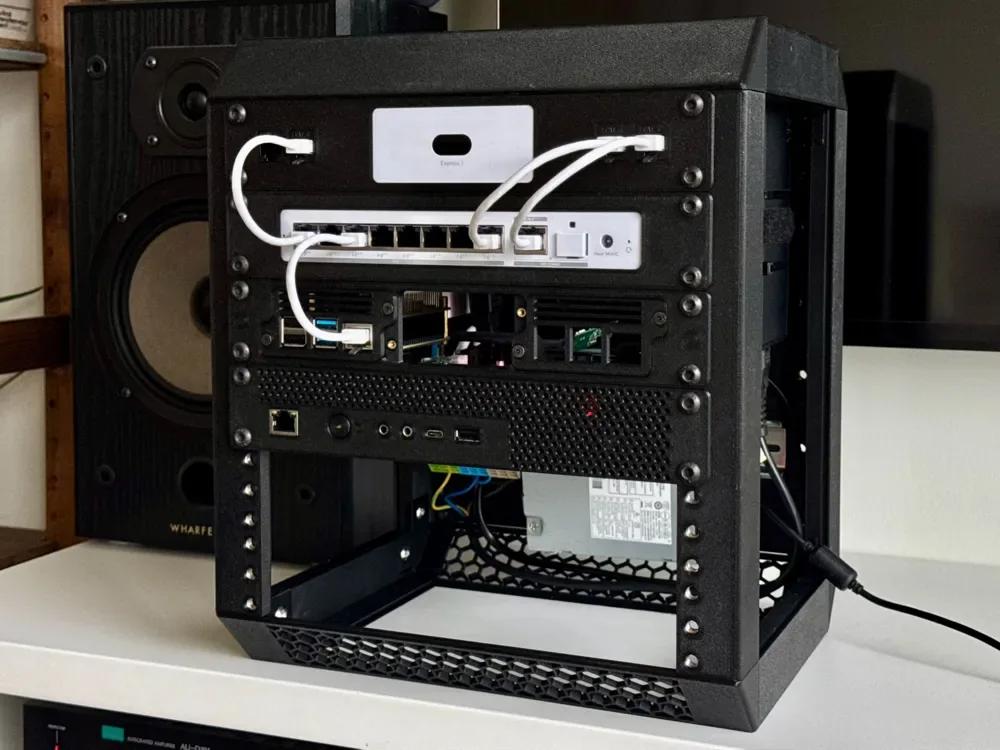
 Design reference photo
Creator photo; included parts are listed below. Accessories not included.
10-inch Rack Panel for UniFi USW Flex 2.5G 8 PoE
3D printed in PETG for mounting the named switch in a compatible rack.
Shipping within Canada is included in the listed price. Applicable taxes are calculated at checkout. Secure checkout for Canadian shipping addresses. Choose your quantity on Stripe. Shipping to the U.S.? Contact us for a shipping quote before ordering. U.S. shipping is an additional charge.
Check fit before ordering ↓A closer look
3D printed in PETG for mounting the named switch in a compatible rack. Includes one printed rack panel and its matching retention piece. Hardware, devices, accessories shown and installation are not included.
Check the fit
Start with these details so you can choose the right part for your setup.
- Confirm your board, connector or rack dimensions and mounting-hole pattern before ordering.
What’s included
- One printed rack panel and its matching retention piece.
- Hardware, devices, accessories shown and installation are not included.
Place the switch around how you use its ports
This rack panel is intended to locate a UniFi USW Flex 2.5G 8 PoE in a compatible 10-inch rack. Before choosing a rack position, consider how you will reach the ports, read the device indicators, and remove a patch lead. A neat front layout is most useful when those routine tasks remain easy after neighbouring equipment is installed. Plan the switch together with its connected cables and any separately supplied power arrangement. A rack position that suits the empty device can become crowded once plug bodies and cable bends are included. The matching retention piece belongs to the mechanical mounting arrangement, so check its access before surrounding the panel with other equipment.
Confirm the exact switch and rack geometry
Compare the full switch model with the named USW Flex 2.5G 8 PoE and check the housing shape, port locations, and required operating clearances. Similar UniFi product names do not establish the same physical fit. On the rack side, verify rail spacing, fixing holes, available depth, and the intended hardware. The listed panel and retention-piece dimensions are individual bounding measurements; they do not define the final installed depth or equipment clearance. Include the switch, the mating arrangement between the printed pieces, and all connected plugs in the space check. If your cabinet has a front or rear door, check closure with realistic cable routing rather than assuming the empty rack depth is fully usable.
Fit the panel without compromising device access
Trial-position the PETG parts and switch with cables disconnected. Check that the device seats naturally and that the retention piece holds the intended area without obstructing a port, control, or ventilation opening. Use suitable separately supplied mounting hardware and avoid drawing a misaligned assembly into place through excessive tightening. Follow the switch manufacturer's guidance for operation, ventilation, and cabling; the printed panel does not change those requirements or add a thermal rating. Route cables with enough slack to service the device without pulling against the mount. After a network change, inspect the retention arrangement and verify that new cable paths do not press on the switch or make the mounting hardware inaccessible.
Product questions
What does the listed price include?
One printed rack panel and its matching retention piece. Shipping within Canada is included in the listed price. Applicable taxes are calculated at checkout. Hardware, devices, accessories shown and installation are not included.
Will this match everything shown in the photo?
The creator photo is a design reference and may show other variants, quantities or accessories. The included-parts list describes exactly what this listing supplies.
Can I use it for a different UniFi switch?
Only after a separate fit check. Share the exact model, housing dimensions, and port-layout photos. The named switch and the 10-inch rack format do not establish compatibility with other devices in the range.
Do I need to allow room behind the switch?
Yes. Include connected plugs, cable bends, any power connection, and access required for service. Check the equipment manufacturer's clearance guidance as well as the depth available in your actual rack.
Can I mount it directly against another device?
Confirm clearances first. Adjacent equipment must not obstruct ventilation, connectors, controls, or the retention piece. Plan enough working space to remove a cable or service the switch without forcing the printed parts.
Original design: mr4lexndr — UniFi USW Flex 2.5g 8 POE 10" rack panel mount. MakerWorld model 2000285. Original design