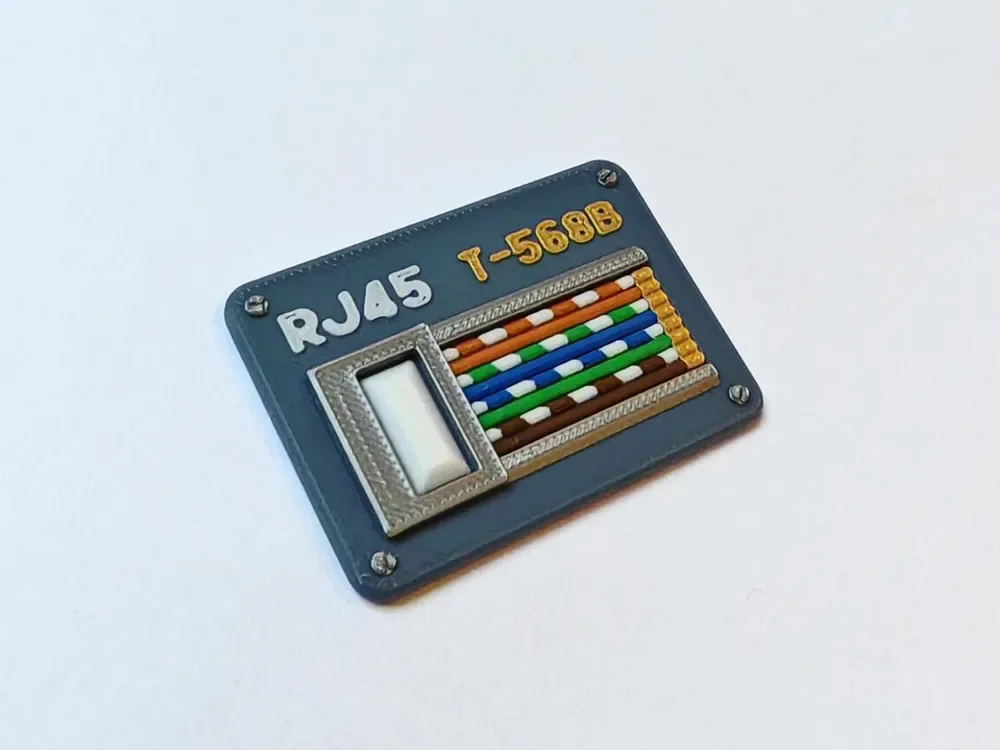
 Design reference photo
Creator photo; included parts are listed below. Accessories not included.
Ethernet Cable Reminder Token
3D printed in PETG for marking one network cable for identification.
Shipping within Canada is included in the listed price. Applicable taxes are calculated at checkout. Secure checkout for Canadian shipping addresses. Choose your quantity on Stripe. Shipping to the U.S.? Contact us for a shipping quote before ordering. U.S. shipping is an additional charge.
Check fit before ordering ↓A closer look
3D printed in PETG for marking one network cable for identification. Includes one printed Ethernet cable reminder token. Electronics, batteries, metal contacts, fasteners, accessories shown and installation are not included.
Check the fit
Start with these details so you can choose the right part for your setup.
- Confirm your board, connector or rack dimensions and mounting-hole pattern before ordering.
What’s included
- One printed Ethernet cable reminder token.
- Electronics, batteries, metal contacts, fasteners, accessories shown and installation are not included.
Give one cable a visible reminder
This token is useful when one Ethernet cable needs to stand out from the surrounding leads. It can support a temporary maintenance reminder, identify a cable you plan to trace or distinguish one connection during a rearrangement. Decide what the token will mean before placing it so its purpose remains clear when you return to the equipment. In a shared workspace, connect that meaning with the existing labeling or maintenance notes instead of assuming another person will interpret an unfamiliar marker the same way.
Choose a position that can be seen and handled
Look at the cable near its connection and along the accessible part of the route. Pick a location where the token is visible without covering a permanent label, obscuring a port indicator or crowding adjacent plugs. Its approximate 40 by 55 by 5 mm bounds make it a distinct physical marker, so account for that space in a dense patch area. Compare the token's attachment shape with the actual cable and any boot, and confirm how it will be fitted before ordering.
Use it with a simple tracing workflow
Record which port or device the marked cable relates to and why it is being singled out. If you are reorganizing connections, work through the relevant equipment procedure and update the notes as the cable's role changes. Remove or relocate the reminder when its job is complete; an old marker can be more confusing than no marker at all. This printed accessory provides no electronic identification or cable testing, so its value comes from being paired with an accurate description of the actual connection.
Keep the marker from becoming an obstruction
Check that the chosen position leaves the connector latch accessible and allows the cable to follow its normal bend. Avoid placing the token where a moving drawer, equipment door or bundle adjustment could catch it and pull on the cable. Inspect the fit when servicing nearby equipment and wipe away dust using a method appropriate for PETG. If the cable is replaced with a different diameter or boot design, compare the attachment again before moving the token to the new lead.
Product questions
What does the listed price include?
One printed Ethernet cable reminder token. Shipping within Canada is included in the listed price. Applicable taxes are calculated at checkout. Electronics, batteries, metal contacts, fasteners, accessories shown and installation are not included.
Will this match everything shown in the photo?
The creator photo is a design reference and may show other variants, quantities or accessories. The included-parts list describes exactly what this listing supplies.
Does the token tell me which device a cable connects to?
It supplies no electronic tracing function. Use it alongside your own port notes, labels or maintenance process so the visible reminder has a clear meaning.
Can I put it directly beside a crowded switch port?
Check the space first. Leave port indicators, plug latches and neighboring connections accessible, and choose a more open section of cable if the token would obstruct them.
When should I remove a temporary reminder?
Remove or update it when the associated maintenance or tracing task is complete. Keeping temporary markers current prevents an old instruction from being mistaken for an active one.
Original design: Zeonia — RJ45 Network Cable - Patch Cable - Reminder Token. MakerWorld model 1417154. Original design